Technical Writing Project • Sarah Amalia
CourseCorrect User Guide: A Web-Based Platform For Career Development
Last updated: August 10, 2025
Independent disclaimer: This user guide is independently created and not officially endorsed by CourseCorrect. Information is based on user experience and may become outdated as the web platform evolves. For official support, please refer to CourseCorrect’s official website and channels.
1. About This Guide
What this guide covers
This guide provides comprehensive instructions for using CourseCorrect. CourseCorrect is a web-based, AI-powered platform that recommends career development courses. The guide serves new users requiring initial setup guidance and existing users accessing advanced platform features.
2. Introduction to CourseCorrect?
2.1 What is CourseCorrect?
CourseCorrect is an AI-powered course matchmaker designed to help ambitious learners find the right upskilling course to move their careers forward. CourseCorrect’s AI (called Cora) matches users with the best fit for their specific goals, skills, and experience level. The platform scans over 150,000 courses across platforms like Udemy, Coursera, and EdX, comparing content, reviews, pricing, and skills taught to make personalized recommendations.
2.2 Key Features overview (benefits)
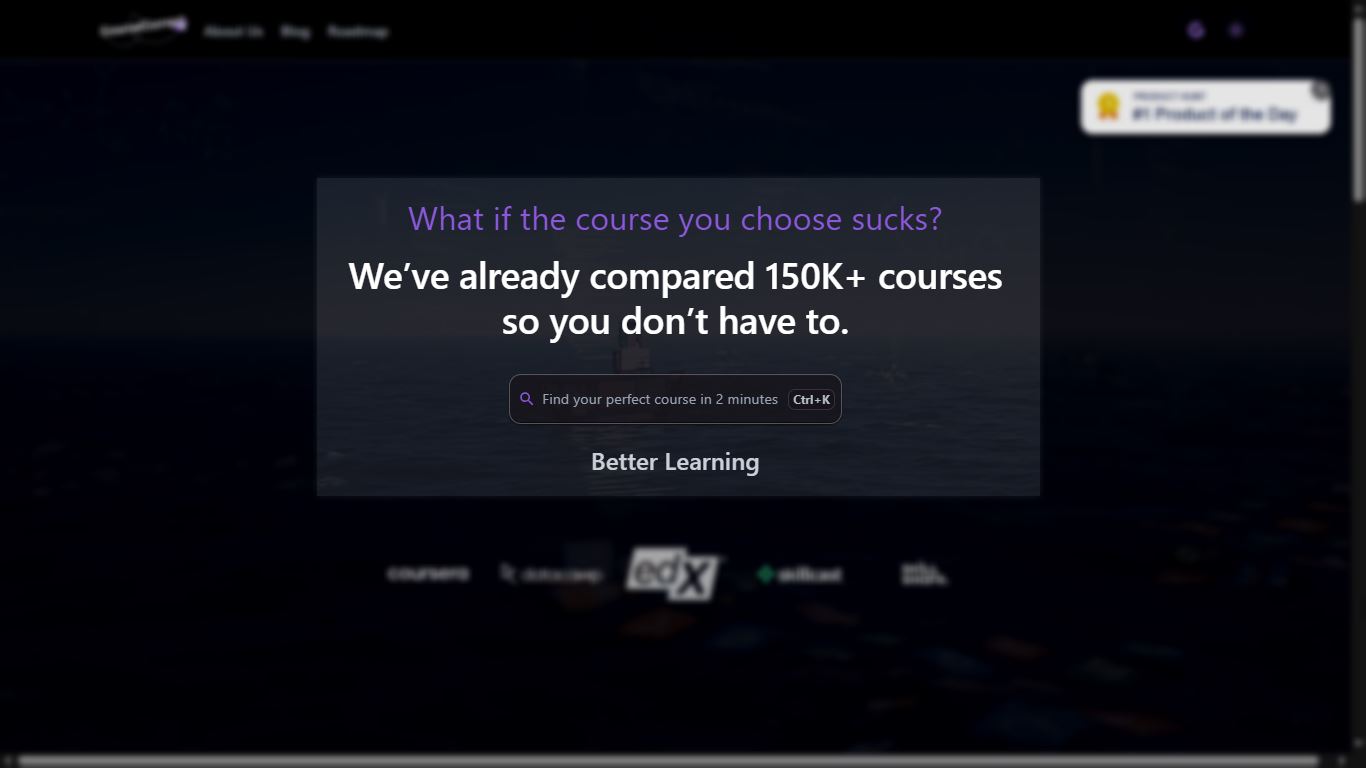
Course Search & Aggregation
- Search functionality that pulls courses from 150,000+ options across multiple platforms.
- Results display up to 20 relevant courses per search query.
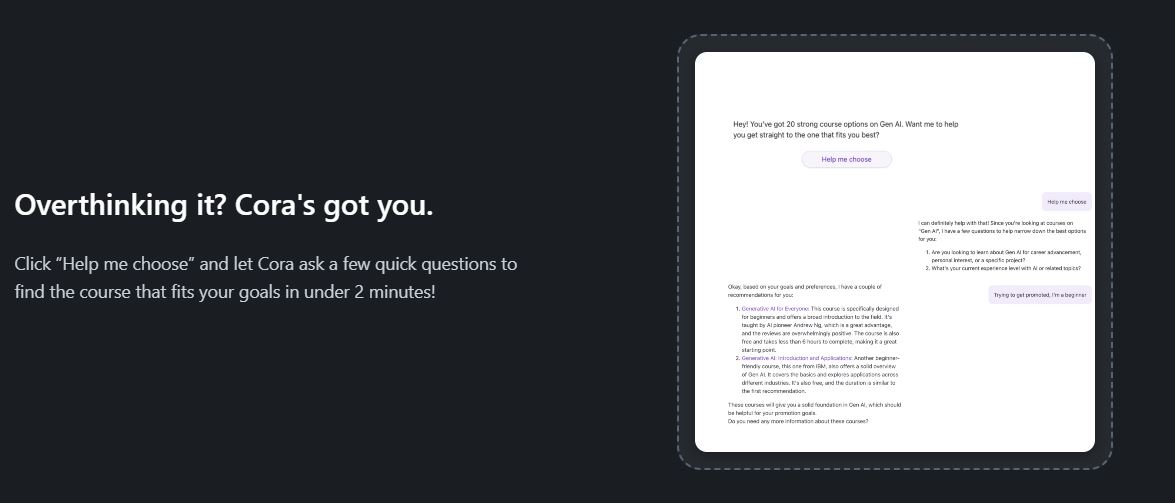
AI Course Matching (Cora)
- Personalized recommendation system that matches courses to your profile.
- Quick assessment process that generates tailored suggestions in under 2 minutes.
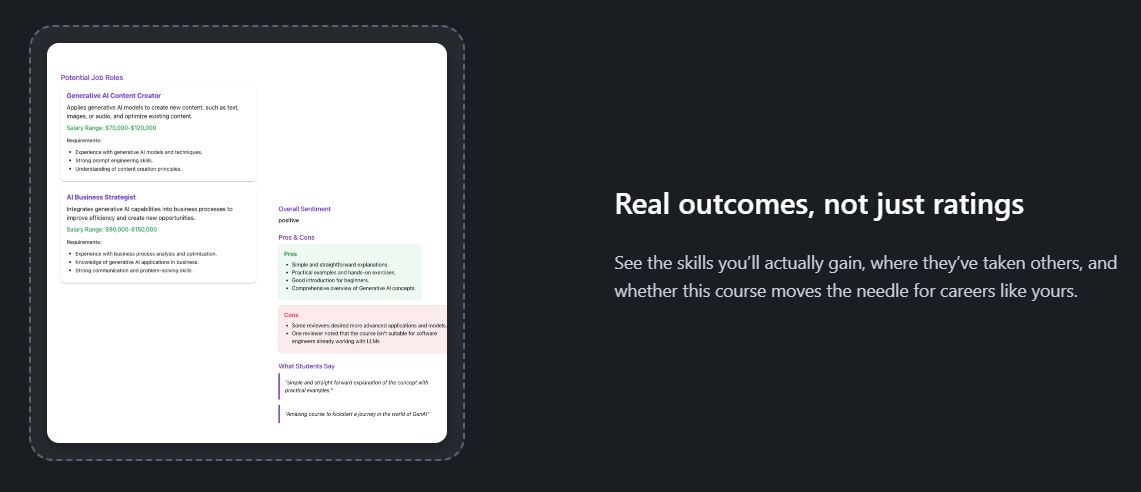
Career Outcomes Analysis
- Course listings include skills taught and potential career paths.
- Salary expectations and job role information for each recommended course.
Multi-Platform Integration
- Consolidated access to courses from Udemy, Coursera, EdX, and other platforms.
- Comparison tools for pricing, content, and reviews across different providers.
2.3 Target Audience?
CourseCorrect is desgined for anyone looking to advance their skills and career through online learning:
Career Changers
People transitioning to new industries or roles who need strategic guidance and courses on skills to develop that will support their career pivot.
Busy Learners
Users who need efficient course discovery without extensive research. CourseCorrect’s AI recommendations reduce the time spent comparing courses and recommended courses across multiple platforms, providing curated options based on your needs and goals.
Students and Lifelong Learners
Students preparing for career entry and recent graduates who need to identify relevant courses that align with their career goals and enhance their capabilities. This includes both structured learners supplementing formal education and self-directed learners exploring specific interests or hobbies.
Professionals
Established professionals focused on continuous learning, leadership development, or specialization in emerging areas to maintain career momentum and advancement opportunities.
2.4 System Requirements
Supported Browsers
- Chrome (recommended), Firefox, Safari, Edge.
- Any latest versions of browsers are recommended for optimal usage performance.
Internet Connection Requirements
- Stable broadband internet connection required.
- Minimum speed fine for course overview and AI interactions (Cora).
Device Compatibility
- Accessible on any device with a web browser (desktops, laptops, tablets, smartphones).
- Responsive design adapts to different screen sizes and devices.
3. Getting Started
3.2. Dashboard Overview

Main navigation
- Google account icon (Top-Right)
- Access your saved courses.
- Log out of your account.
- Theme toggle (Moon/Sun icon)
- Switch between Dark or Light theme.
Menu icon (Two Horizontal line)** (on mobile device)
- Opens additional platform information:
- About us
- Blog
- Roadmap
Core Dashboard Elements
- Main Search Bar (center)
- Primary course discovery tool.
- Placeholder text: “Find your perfect course in 2 minutes”.
- Keyboard shortcut:
ctrl+Kfor quick access
Platform Partners Display**
- Bottom section showing integrated learning platforms.
- Indicates course sources (Coursera, datacamp, edX, Skillcast, and Skillshare).
3.1. Account Creation
Prerequisites
- Google business, educational, or organizational account (company, university, or organization domain)
- *Personal Google account are not supported.
Step-by-step registration
- Go to the official website of CourseCorrect: coursecorrect.fyi
- Click the Google sign-in icon ("
g" icon) on the top-right corner of the website.
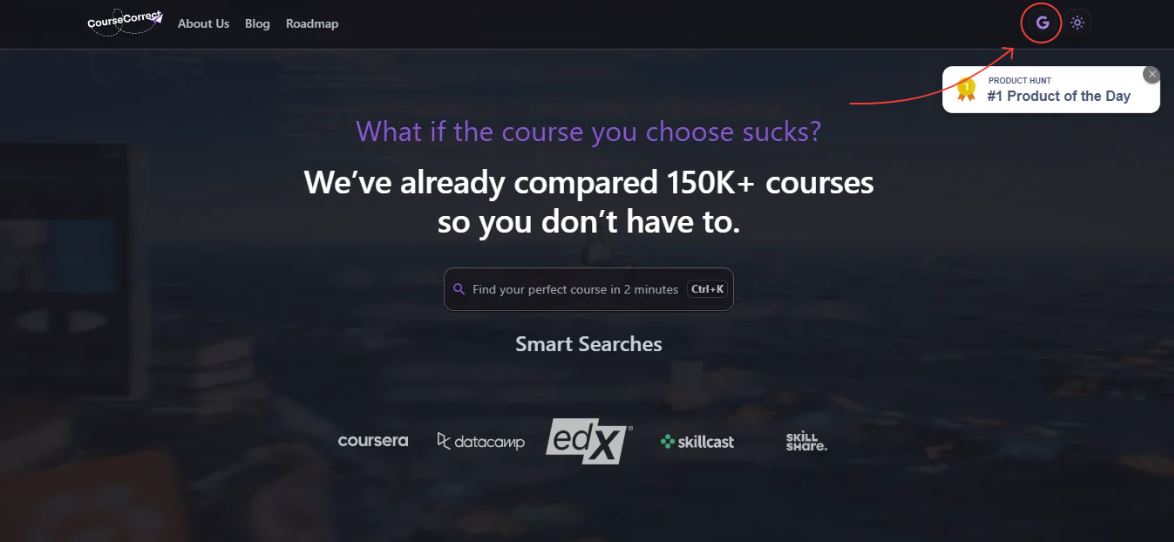
- Select your Google business or educational account from the authentication page.
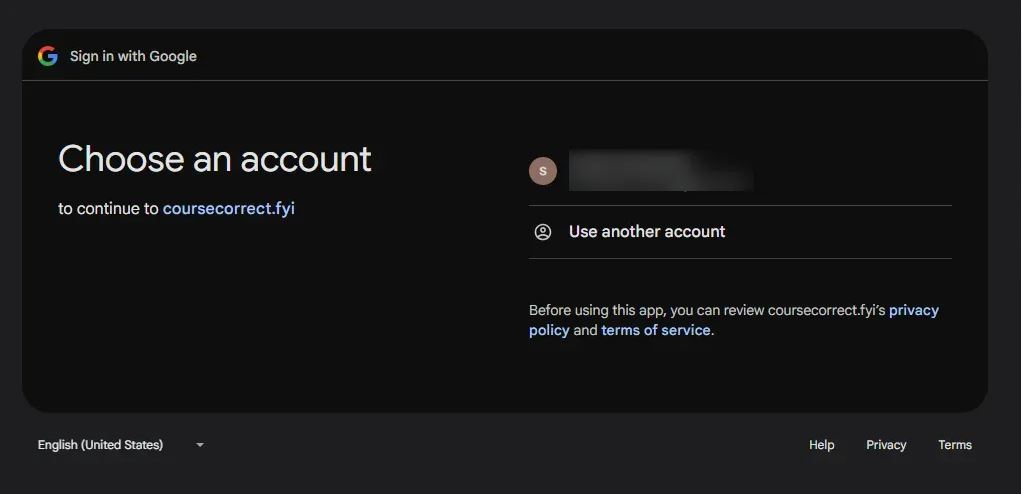
- Review and accept the agreement allowing CourseCorrect to access your name and email address.
- Click “continue” to proceed with account creation.
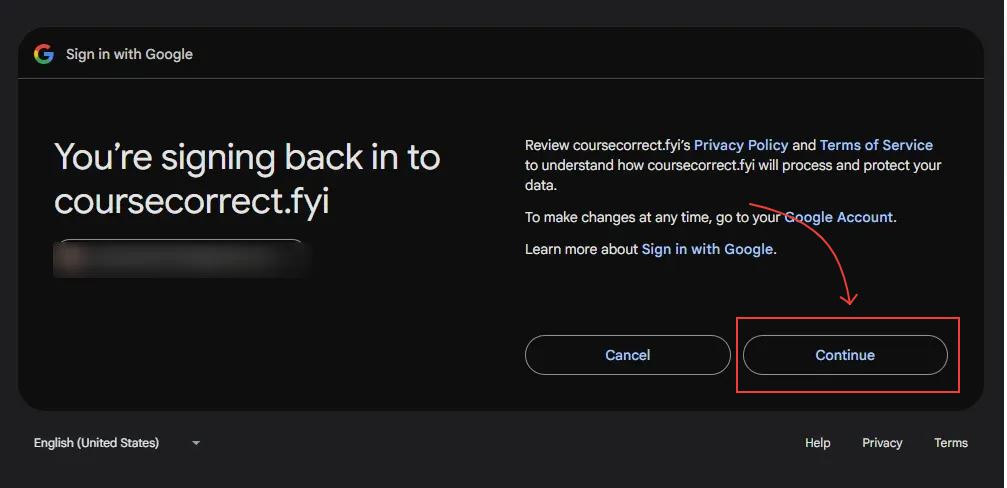
- You’re all set! Account setup is complete and you can begin using the platform.
4. Core Features Deep Dive
4.1 Course Discovery
Search functionality
- Search Input process
- Enter skill or topic in the main search bar.
- The platform will provides auto-suggestions for skill types as you type.
- Search works with or without selecting suggested skills.
- Press
Enteror click search to execute the query.
- Quick Search Access
- Use
ctrl+Kshortcut from anywhere on the platform. - Opens search bar for immediate input.
- Use
Search Results and Filtering
- Filter Categories
- Level: Beginner, Intermediate, Advanced.
- Language: English, Hindi, Chinese, Indonesian, and more.
- Provider: Coursera, Skillshare, edX, DataCamp, Udemy, and others.
- Filter Controls:
- Click “Update” at the bottom to apply selected filters.
- Click “Clear all” at the top to reset all filters.
- Results Display
- Course Presentation
- Display 20 courses per seacrh query (options for 10 or 15 per page view).
- Pagination: “Next Page” button navigates through additional results.
- Course Card Details:
- Reviews, “Preview” button, save option, enroll button.
- Displays level and provider name.
- Course Presentation
4.2 AI Course Matching (Cora)
How to access Cora
- Desktop: Click the chat bar on the dashboard’s right side.
- Mobile: Tap the chat widget at the bottom-right corner.
- Interaction: Type directly into the “Type your message” bar.
Using Cora for Course Selection
- Automatic Assistance:
- Click “Help Me Choose” for guided questions about your search.
- Receives course recommendations based on your topic.
- Custom Queries
- Ask career/course-related questions.
Cora’s Assessment Process
- Initial Question Types:
- Purpose: "Are you looking to learn [topic] for career, advancement, personal interest, or a specific project?
- Experience level: "What is your current experience level? (beginner, intermediate, or advanced)
- Personalized Matching:
- Adapts follow-up questions based on responses.
- Provides targeted course recommendations in under 2 minutes.
- References search history and past interactions.
4.3 Course Details Page
Course Information Overview
- Header Section
- Course title and topic display
- Star ratings with numerical score
- Save button for bookmarking
- Primary “enroll” button (redirects to provider platform)
- Essential Details Panel
- Skill level: Beginner, Intermediate, or Advanced indication
- Provider: Course Platform
- Institution: Educational institution or organizational offeirng the course
- Language: Course instruction language
- Cost: Price information and payment details
- Time Commitment: Exoected duration and weekly hours
- Course Content
- Certificate: Whether completion certificate is provided
- Description: Comprehensive course overview and learning objectives
- Related Fields: Connected areas of study and complementary topics
Course Content Tabs
Career Insights
- Key Topics:
Core subject and skills covered in the course - Career Opportunites:
- Complementary skills: Additional abilites that pair well with the course
- Growth Potentials Industry demand and career advancement possibilities
- Potential Job Roles
- 3 career paths options, each course provides three relevant job opporunities
Featuring:- Job roles: specific position could pursue
- Salary range: Expected compensation levels for each role
- Requirements: Skills, experience, and qualifications needed for each position
- 3 career paths options, each course provides three relevant job opporunities
What People Think
- Overall Sentiment: Positive or negative sentiment analysis
- Pros and Cons: Balanced breakdown of the course strength and limitations
- Student Reviews: Direct testimonials and quotes from actual learners
Overview
- Comprehensive Course Description:
- What the course covers and its practical applications
- Target audience and prerequisites
- Specific examples of what to learn and to do
- Detailed breakdown of key learning outcomes
- How the skills can be adapted across different contexts
Curriculum:
Module-by-module breakdown
5. Complete User Workflows
5.1 Career Exploration Workflow
Discovering new career possibilities
- Step 1: Use the search bar to explore broad career fields (e.g., “Writer”, “Digital Marketing”, “Artificial Intelligence”).
- Step 2: Browse course results to discover different specializations within each field:
- Writing: creative writing, copywriting, technical documentation.
- Digital Marketing: social media management, content marketing.
- AI: machine learning, LLM, NLP.
- Step 3: Click the preview button on the course cards and review to understand:
- Key topics and skills in each specialization
- Career insights to understand the complementary skills, growth potential, and potential job roles with salary ranges
- Save the interested courses from different specialization for comparison:
- Skill requirements for each job roles
- Growth potential
- Salary ranges
- Create a shortlist of promising career directions based on previous comparison.
5.2 AI Guided Learning Decision Workflow
Personalized Course Recommendations
- Step 1: Acces Cora AI via chat bar (desktop) or chat widget (mobile)
- Step 2: Click “Help me choose” or ask: “I want to learn [topic], what should I focus on first?”
- Step 3: Answer Cora’s assessment questions:
- Learning purpose (career change, advancement, personal interest, specific project)
- Current experience level (beginner, intermediate, advanced)
- Timeline course period
- Step 4: Engage with Cora’s follow-up questions for personalized recommendations
- Step 5: Ask Cora to compare recommended courses: “which course is better for someone with my background? Make a table comparison”
- Step 6: Use Cora’s suggestions to search and filter courses with specific criteria.
- Step 7: Save Cora’s recommendations for detailed evaluation
5.3 Skill Development Workflow
Identify Needs for Targeted Skills
- Step 1: Research target industry requirements through “Career Insights”
- Step 2: Consult Cora about transition strategy: “I’m moving from [current field] to [target field], what shoul I learn?”
- Step 3: Identify transferable skills and knowledge gaps through course comparison.
- Step 4: Prioritize course based on:
- Job Roles With highest salary potential
- Requirements that match you
- Growth Potential in the target industry
- Step 5: Create a transition timeline based on course time commitment.
- Step 6: Use feedback section to understand real-world application success.
- Step 7: Build portfolio of certificates and skills that demonstrate transition readiness.
- Step 8: Leverage Key Points information to explore alternative into the new career.
6. Frequently Asked Questions
6.1 General Questions
What is CourseCorrect?
An AI-powered platform that helps you discover the best online courses from multiple providers (Coursera, Udemy, edX, etc.). It matches courses to your:
✔ Career goals
✔ Skill level
✔ Learning preferences
Plus, it provides career insights (job roles, salaries) and AI recommendations via Cora.
How does CourseCorrect work?
CourseCorrect works through three main components:
- Seacrh and Filters
- Use the search bar with auto-suggestions and filter by level, language, and provider.
- AI Matching (Cora)
- Answer a few questions; get personalized course recommendations in 2 minutes.
- Course Details
- Explore career insights, reviews, overview, curriculum and more before enrollment.
Who should use CourseCorrect?
CourseCorrect is designed for anyone looking to advance their skills and career through online learning: ✔ Career Changers—Find skills needed for new roles. ✔ Professionals—Upskill for promotions or industry shifts. ✔ Students and Lifelong Learners—Supplement education or explore interests. ✔ Busy Learners—Save time with AI-curated courses.
What makes CourseCorrect different?
- AI-powered recommendations: Cora tailors suggestions to your goals.
- Multi-provider search: Compare courses across multiple platforms in one place.
- Career insights: See job roles, salary ranges, and growth potentioal per course.
- Authenticated reviews: Genuine feedback from real students with sentiment analysis.
6.2 Account & Access
How do I create CourseCorrect account?
Simply sign in using your existing business account credentials. CourseCorrects uses secure enterprise authentication, so there’s no additional password to remember.
Can I change my email address?
Your Email address on CourseCorrect is linked to your business account. To change your email address, you’ll need to update it through your business account provider’s settings. The change will automatically reflect in your CourseCorrect account the next time you log in.
How do I delete my account?
Currently, there is no self-service account deletion option available. However, you can log out of your CourseCorrect account at any time using the log out button. If you need your account permanently removed, please contact our support team for assistance with account deletion.
6.3 Features and Functionality
How accurate are CourseCorrect recommendations?
Cora delvier relevant suggestions by analyzing:
- Your stated goals and experience level
- Popular courses among similar learners
- Real-time quality indicators
- Authenticated reviews from actual students
The more specific information you provide to Cora about your goals and background, the more accurate and personalized your recommendations become.
How can I compare courses?
You can chat with Cora and ask it to compare courses you’re interested in. Cora will provide your options’ pros and cons, helping you make infomred decisions based on your goals and learning needs.
Can I track multiple career goals?
Yes! You can explore multiple career paths by:
- Using Cora to explore different career options
- Bookmarking/saving courses manually
- Comparing career options by reviewing the career insights section for each course
Does CourseCorrect handle course transactions?
No. CourseCorrect is a discovery platform that:
- Directs you to providers for enrollment.
- Displays all pricing in the “Course Details” section.
- Never process payment directly.
Are course reviews trustworthy?
Yes! CourseCorrect authenticates all course reviews to ensure genuine insights from real learners. It’s provide transparent, honest feedback to help you make informed learning decisions.
How often is content updated?
CourseCorrect continuously updates its course database to ensure you have access to the latest offerings from all provider platforms. New courses are added regularly as they become available from our partner providers.
How can CourseCorrect help me advance in my career?
CourseCorrect helps you stay ahead by providing personalized recommendations in growing fields like AI, data science, and technology. Its career insights show job roles, salary ranges, and growth potential to guide your learning path.
6.4 Pricing & Plans
How much does CourseCorrect cost?
CourseCorrect is completely free to use. There are no subscription fees, hidden cost, or premium tiers—all feature are available to every user at no charge.
What’s included?
All users have access to every feature:
- Unlimited course searches.
- Full access to Cora, AI course matching assistant.
- Complete course details and overview
- Course filtering tools
- Save or bookmark capabilities
How does CourseCorrect make money if it’s free?
CourseCorrect earns affiliate commissions from course providers when you enroll through the CourseCorrect platform. There’s no additional payment using CourseCorrect.
6.5 Privacy & Security
How is my data protected?
CourseCorrect takes a minimal data collection approach to protect your privacy. When you log in using your business account, CourseCorrect only requests access to your name and email address. The platform focuses on helping you find courses without building detailed user profiles.
Who can see my profile information?
Your porfile information is private and only accessible to you and CourseCorrect’s system for account authentication purposes. Your profile data is used solely for account access and platform functionality.
Can I make my profile private?
Since CourseCorrect only collects your name and email address for basic authentication, there are no additional privacy settings to configure. Your information is already kept private by default, so there’s minimal data that would need additional privacy controls.
How does CourseCorrect use my data?
CourseCorrect uses your data in very limited ways:
- Name and Email address: Only for account authentication and login purposes
- AI conversations: Cora references your previous conversations to provide better recommendations, but only when you actively ask questions. Your search history and browsing patterns are not used for AI recommendations. You can delete all conversations or reset your chat history with Cora AI at any time.
6.6 Technical Support
What browsers work best?
CourseCorrect work on all major browser including Chrome, Firefox, Safari, and Edge. For optimal performance, using the latest version of browser is recommended.
Is offline access available?
No, offline access is not available. CourseCorrect is a web-based platform that requires a stable internet connection to function. A stable boradband connection is the best experience, through basic internet speeds are sufficient for course browsing and AI interaction.
How do I report bugs?
If you encounter any technical issue while using CourseCorrect, you can contact through the official channels listed at the end of the platform page.
Can I share ideas or feedback about the platform?
Absolutely! As a new platform, CourseCorrect is actively seeking user feedback and ideas to improve the user experience. Whether it’s about new features, user interface improvements, or any other ideas that could make course discovery better.
To submit feedback:
- Click the
menubutton on the top-right corner - Select “Roadmap” from the menu options
- On the Roadmap page, click the feedback menu
- Click the “+submit” button on the bar to share your ideas.
7. Troubleshooting
7.1 Account Issues
Login Problems
| Symptoms | Possible Cause | Solution | Prevention |
|---|---|---|---|
| Google sign-in button not working, authentication fails | Personal Google account used, pop-up blocked, multiple accounts | 1. Ensure using business/educational Google account 2. Enable pop-ups 3. Clear browser cache |
Use business Google account, whitelist CourseCorrect domain |
| “Account type not supported” message | Using personal Gmail account | Switch to business/educational Google account | Verify account type before attempting login |
| Stuck after clicking “continue” | Process freezes after clicking “continue” on the permissions screen | Declinced access permissions, firewall blocking | 1. Re-authorize CourseCorrect access 2. Accept name.email permissions 3. Check corporate firewall settings |
7.3 Data & Progress Issues
| Problem | Symptoms | Possible Causes | Solutions | Prevention |
|---|---|---|---|---|
| Incorrect Recommendation | Irrelevant course suggestions | Vague search terms, poor filtering, unclear conversations with Cora AI | 1. Try different filter combinations that matched your specific needs 2. Ask Cora AI for personalized recommendations 3.Use clear, specific prompts that match your neeeds 4. Be detailed about your goals |
Use specific search terms and previously discuss with Cora AI |
| No search results | Empty results page, “No courses found” | Overly specific filters, typos in search terms, unsupported topics | 1. Clear all filters and retry 2. Check spelling of search terms 3. Try borader, more general topic/keywords |
Start with general terms or related topic course |
7.4 Performance Issues
General Slowness
| Problem | Symptoms | Possible Causes | Solutions | Prevention |
|---|---|---|---|---|
| General slowness | Platform responds slowly | High traffic, local connection, unclear browser cache, old processor and spam device | 1. Try different times 2. Check internet connection 3. Try a different browser or device clear browser tab and cache |
Use during off-peak hours, check browser cache, clear browser tab |
8. Getting Help & Support
8.1 Self-service Options
Official Documentation and Learning
- Knowledge base: Official blog of CourseCorrect for tips and updates.
- Video tutorials: Official video tutorials showing platform features
- FAQ section: Official FAQ page for common questions
Community & Feedback
- Product Community: Join discussions on Producthunt
- Feature Requests: Submit ideas and feedback here or Platform Feedback: Use the in-platform feedback system (Menu → Roadmap → Feedback → +Submit)
Direct Support
Email Support: info@coursecorrect.fyi for technical issues and help
8.2 Getting the Most Help
Before Contacting Support
- Check the FAQ—both official and this guide— for common issues.
- Try troubleshooting steps
- Search the official blog for recent updates or known issues
- Watch video tutorials for visual guidance on platform features
When Contacting Support
- Be specific about your issue and what you were trying to do
- Mention steps you’ve already tried
- Use clear subject like “login issue” or “search not working”
Community Engagement
- Share feedback about your course discovery experience
- Suggest improvements through the feedback system
- Engage on ProductHunt to connect with other users and share tips
Document Version: 1.0 • Last Updated: Aug, 2025 • Maintained by Sarah Amalia